 Nimbo
Short answer
To sign a PDF on iPhone Duo, unfold the phone, open the document in Nimbo, tap PDF Tools, then Sign, draw your signature with your finger and drop it on the page. Unfolded, the Library stays beside the document and the page thumbnails take you to the right page. Your signature stays on the phone. Signing is part of Nimbo Pro.
What changes when you sign on iPhone Duo
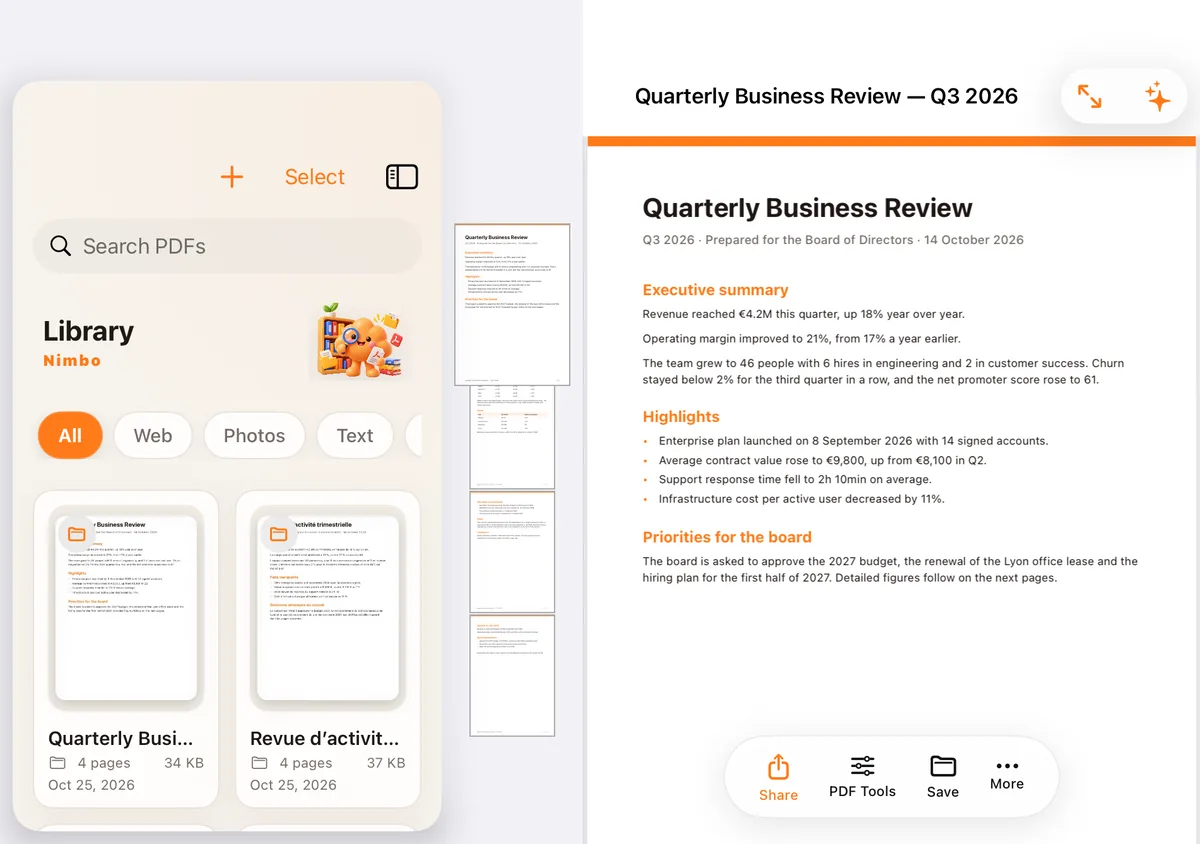
The signature itself works as on any iPhone: PDF Tools, Sign, a stroke of the finger, a pinch to resize. What changes is everything around it. Unfolded, the inner screen shows two panes: the Library on one side, the document on the other. You find the right file without closing the one you are reading.
In the Reader, the page thumbnails sit beside the PDF. On a twenty-page contract, the page to sign is one tap away. In landscape, two pages show side by side, like an open book: you read the clause on one side and sign on the other. The reading PDFs on iPhone Duo article walks through every layout.
Step by step
- Unfold the phone and open Nimbo. The Library takes one side of the inner screen.
- Tap the PDF to sign. It opens beside the list. If it is in Files, open Files beside Nimbo and drag it into the Library.
- Tap the thumbnail of the page that needs your signature.
- Tap PDF Tools, then Sign. Draw your signature with your finger, or pick one you saved earlier.
- Drag it into place and pinch to resize it. Add the date if the document asks for it.
- Tap Done, then Share: the signed PDF goes out by Mail, Messages, AirDrop or any other app.
Need the whole surface to place the signature precisely? The full screen button gives the entire inner screen to the PDF. The same button brings the pane back.
Folded or unfolded?
Both work. Folded, Nimbo behaves like on any iPhone, in one column: the quickest way to sign a one-page delivery note. Unfolded, you gain the review: the list, the thumbnails and two pages at once.
You can change your mind halfway. When you fold or unfold, Nimbo keeps the page you are on and the zoom. Closed, you see the last screen; open, the last two. The iPhone Duo page shows every layout.
Stamps, forms and passwords
A signature alone is often not enough. In the same screen, Nimbo adds a stamp such as APPROVED or CONFIDENTIAL, a place-and-date line, or a company stamp. If the PDF has form fields, fill them in the Reader before signing; on a computer, the free Fill PDF form tool does it in the browser.
- Keep several signatures: your full name for contracts, your initials for each page.
- Export the file flattened, so the signature cannot be moved afterwards.
- Protect a confidential document with a password before sharing it: the password guide explains the options.
The document is on paper?
Scan it first. Tap Scan and hold the page in view: the edges are detected and the page is cropped. Scanning works folded or unfolded, a scan in progress continues when you fold, and scanning to PDF is free. The scanning on iPhone Duo article has the details.
Where your signature stays
On your iPhone, in the app's private storage. Opening the file, drawing, placing, stamping, protecting and exporting all run on the device. Nothing is sent to a server, and there is no account. The sign guide covers the signing screen in detail, and the how it works page lists exactly what the AI features send; signing is not one of them.
Frequently asked questions
Is signing free on iPhone Duo?
The rules are the same as on every iPhone. Signing, stamps and passwords are part of Nimbo Pro, like the other PDF tools in the app. Scanning and importing are free. The monthly plan starts with a 3-day free trial for new subscribers. On a computer, the Sign PDF tool on this site is free and runs in the browser.
Do I need a special version of Nimbo for iPhone Duo?
No. The two-pane layouts are part of Nimbo 1.0 on the App Store. The same build serves every iPhone and iPad.
Is a signature drawn on iPhone legally valid?
For many everyday documents (quotes, leases, school forms, internal approvals) a simple electronic signature is accepted. Some documents require an advanced or qualified signature issued by a certification provider, which Nimbo does not provide. When in doubt, ask the party that sent you the document.